Ahead of the migration to the new system
FörsäkringsGirot is responsible for the migration itself from COINS to the new system. The migration is scheduled between two reporting periods so that ongoing administration can continue without interruption.
When it is time for your migration, we will contact you with dates, information and next steps.

Checklist ahead of migration
When we notify you of the migration date, we will ask for the following:
1. Appoint a contact person and an account administrator
Let us know who will be your contact person during the migration and who will be the account administrator, KA, in the new system.
The account administrator is granted access rights and is responsible for adding users and assigning roles and permissions after the migration.
2. Upload your current pension policy
Upload your latest pension policy to Safepoint in Mitt Fgiro under Attachments to customer service requests.
We will check the information against the policy details we have on record before the move.
3. Review who needs access
Identify who needs to work in the new system and what type of access they need.
This could include people who work with:
- payroll files
- reporting
- invoice summary
- finance and accounting documentation
- administration and follow-up.
The account administrator sets up and manages permissions in the new system.
4. Attend our walkthrough and kick-off
Ahead of your launch, we invite the account administrator to a walkthrough of the new system and ask them to invite colleagues and external partners who work in our systems.
We recommend that anyone who will regularly work in the system attends.
5. Inform the relevant colleagues and partners
Share information about the move with those affected, such as colleagues in HR, payroll and finance, as well as external payroll or accounting partners.
How the migration works
Before the migration
You continue working in COINS as usual. Meanwhile, FörsäkringsGirot prepares your configuration in the new system and checks the information needed ahead of the migration.
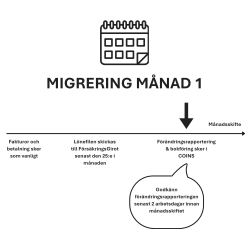
The final month in COINS
The payroll file is sent as usual, and change reporting, accounting, invoices and payments are handled as normal.
The month is closed once reporting has been completed and the accounting file has been generated and uploaded to Mitt Fgiro.
FörsäkringsGirot carries out the migration
After the final reporting period, FörsäkringsGirot transfers your information and configuration to the new system.
Among other things, we ensure that relevant details, historical data, your pension policy, chart of accounts and mapping rules are available in the new environment.
After the migration
Once the migration is complete, you continue working in the new system.
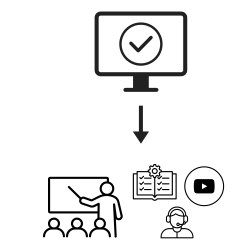
You will be invited to a walkthrough when you get started. Training materials, including videos, quick reference guides and instructions, will then be available to support both existing users and future new users.
The training materials are available in Mitt Fgiro under Help
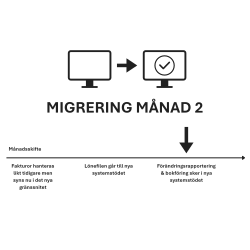
The first month in the new system
You gain access to the new system, and the payroll file is then handled in the new environment.
Ongoing administration, reporting, accounting and invoice processing continue, but you now work in the new interface.